

I had a stuck timesheet entry I was trying to get through the approval process. I deleted the approval (because it wouldn’t go away on it’s own when I rejected it) and tried to recall the time sheet entry so that I could resubmit it and hopefully fix everything. Recalling the time sheet entry kept failing, though, with the following error message:
Entity 'calendar' With Id = <guid> Does Not ExistGoogle didn’t help, and neither did ChatGPT (the two things I try first). Next step, digging.
Answer
Use advanced find, find the offending record in Time Off Calendar, and delete it.
How did I fix it?
I could just leave it at the answer, but giving some insight to how I troubleshoot might be interesting to someone, so here it is.
This time, it was a combo of things; XRMToolbox, Excel, and advanced find.
There was no calendarid on the time sheet entry. I also looked on the systemuser record, the bookable resource record, and the resource record – I couldn’t find any records with the GUID shown in the error message. I went first to XRMToolbox.
XRMToolbox – fail
Thankfully, there was a handy little tool called “Field Seeker”. I put the “calendarid” field in there and looked for all the places that this particular name was used.
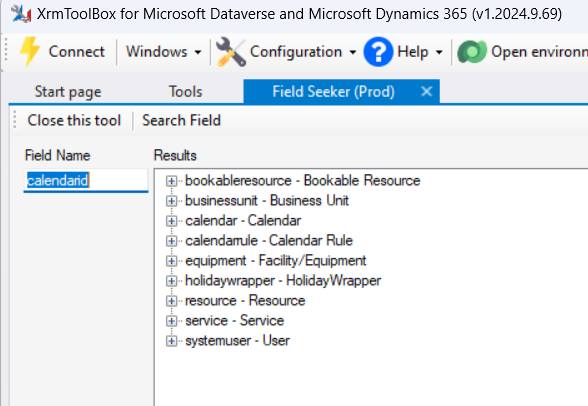
Using the FetchXML builder I tried to look for a record with the calendarid value in each of these results. I didn’t find any.
Excel – fail
Next, I tried Excel.
I was hoping to find the calendar entity in the list of entities in the Microsoft PowerApps Office Add-in, but I didn’t. I just kept looking, though for something that jumped out at me. I had problems with querying the calendarrule entity in XRMToolbox, so I tried it here, and it didn’t work here either.
Advanced find – success
Advanced find has been hidden for years now, but this wonderful post showed me how to access it again: Help, Where Did My Advanced Find Button Go? – A Dynamics 365 Help Guide
After finding advanced find, I wanted to look for that stupid calendarrule entity and see what was in it. I couldn’t find it in here, so I just kept looking. I happened across the “Time Off Calendars” entity, found it had a field called “msdyn_calendar”, and got to searching. Sure enough, there was a record in this table with the GUID I was searching for.
I deleted the record and then was able to recall the time sheet entry.
Leave a Reply